Permissions
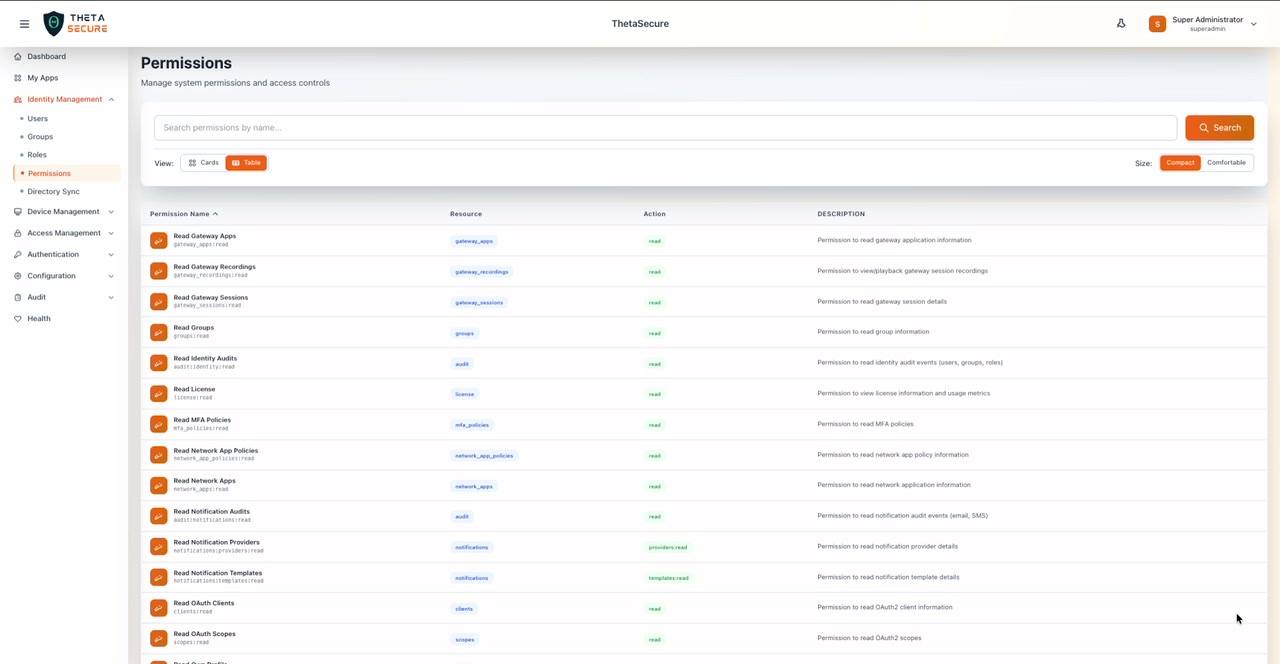
ThetaSecure ships with 173 system-defined permissions that cover every action across every module in the platform. These permissions are the building blocks of the role-based access control system. They cannot be modified or deleted because they represent the complete surface area of what is possible inside ThetaSecure.
This matters because zero trust is not just about network segmentation or device posture. It extends to administrative access itself. In a zero-trust environment, no administrator should have more access than their responsibilities require. ThetaSecure makes this achievable by providing permissions at an exceptionally granular level, so you can build roles that map precisely to each person's job function on a strict need-to-know basis.
Consider a practical example: your helpdesk team needs to reset passwords but should never touch authentication policies. A compliance officer needs to read every audit log category but should never modify user accounts. A network operations engineer needs to manage VPN configuration and RADIUS clients but has no business viewing identity audit trails. With 173 discrete permissions, each of these scenarios can be addressed with a custom role that grants exactly the right access and nothing more.
How Permissions Work
Every permission in ThetaSecure has three attributes:
| Attribute | Description |
|---|---|
| Permission Name | Human-readable label describing the capability (e.g., "Read Gateway Apps") |
| Resource | The module or data type the permission applies to (e.g., gateway_apps, users, audit) |
| Action | The operation being granted (e.g., read, create, delete, manage, admin) |
The internal identifier follows a resource:action pattern. For instance, users:create grants the ability to create new user accounts, while users:read only allows viewing existing users. This naming convention makes it straightforward to understand what any permission does, even without reading its description.
Permissions are not assigned to users directly. Instead, they are bundled into Roles, and roles are assigned to users or groups. This approach keeps access management scalable and auditable.
Permission Actions
ThetaSecure organizes permissions around seven action types, each representing a different level of access:
| Action | Purpose | Example |
|---|---|---|
| read | View-only access to a resource | users:read allows reading user profiles |
| list | Enumerate resources (browse, search) | devices:list allows listing registered devices |
| create | Provision new resources | groups:create allows creating new groups |
| update | Modify existing resources | mfa_policies:update allows editing MFA policies |
| delete | Remove resources permanently | roles:delete allows deleting custom roles |
| manage | Full lifecycle control over a resource | devices:manage allows approve, reject, block, and quarantine |
| admin | Elevated administrative control | license:admin includes lockdown management |
Some resources have additional specialized actions like assign (for policies and roles), sync (for directory connectors), evaluate (for policy testing), terminate (for active sessions), and revoke (for devices and signed URLs).
Complete Permissions Catalog
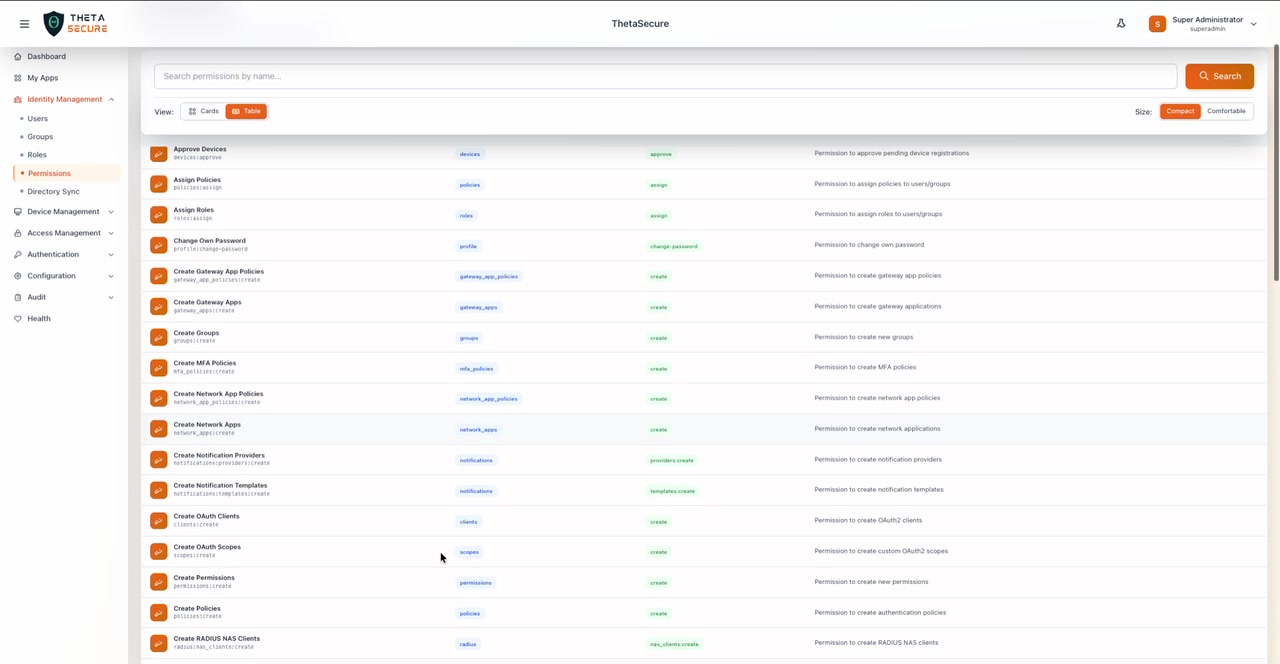
Below is the full list of all 173 permissions available in ThetaSecure, organized by action type.
Approve and Assign
| Permission | Resource | Description |
|---|---|---|
| Approve Devices | devices | Approve pending device registrations |
| Assign Policies | policies | Assign policies to users/groups |
| Assign Roles | roles | Assign roles to users/groups |
Change
| Permission | Resource | Description |
|---|---|---|
| Change Own Password | profile | Change own password |
Create
| Permission | Resource | Description |
|---|---|---|
| Create Gateway App Policies | gateway_app_policies | Create gateway app policies |
| Create Gateway Apps | gateway_apps | Create gateway applications |
| Create Groups | groups | Create new groups |
| Create MFA Policies | mfa_policies | Create MFA policies |
| Create Network App Policies | network_app_policies | Create network app policies |
| Create Network Apps | network_apps | Create network applications |
| Create Notification Providers | notifications | Create notification providers |
| Create Notification Templates | notifications | Create notification templates |
| Create OAuth Clients | clients | Create OAuth2 clients |
| Create OAuth Scopes | scopes | Create custom OAuth2 scopes |
| Create Permissions | permissions | Create new permissions |
| Create Policies | policies | Create authentication policies |
| Create RADIUS NAS Clients | radius | Create RADIUS NAS clients |
| Create RADIUS Policies | radius | Create RADIUS policies |
| Create Roles | roles | Create new roles |
| Create Signed URLs | storage | Create signed URLs for file sharing |
| Create Signin Profiles | profiles | Create signin profiles |
| Create Storage Backends | storage | Create storage backends |
| Create Sync Profiles | sync-profiles | Create AD/LDAP sync profiles |
| Create Users | users | Create new users |
| Create VPN | vpn | Create VPN profiles, allocate IPs, register servers |
| Create Web App Policies | web_app_policies | Create web app policies |
| Create Web Apps | web_apps | Create web applications |
Delete
| Permission | Resource | Description |
|---|---|---|
| Delete Connectors | connectors | Delete connectors |
| Delete Devices | devices | Delete/remove devices |
| Delete Files | storage | Delete files from storage |
| Delete Gateway App Policies | gateway_app_policies | Delete gateway app policies |
| Delete Gateway Apps | gateway_apps | Delete gateway applications |
| Delete Groups | groups | Delete groups |
| Delete MFA Policies | mfa_policies | Delete MFA policies |
| Delete Network App Policies | network_app_policies | Delete network app policies |
| Delete Network Apps | network_apps | Delete network applications |
| Delete Notification Providers | notifications | Delete notification providers |
| Delete Notification Templates | notifications | Delete notification templates |
| Delete OAuth Clients | clients | Delete OAuth2 clients |
| Delete OAuth Scopes | scopes | Delete custom OAuth2 scopes |
| Delete Permissions | permissions | Delete permissions |
| Delete Policies | policies | Delete authentication policies |
| Delete RADIUS NAS Clients | radius | Delete RADIUS NAS clients |
| Delete RADIUS Policies | radius | Delete RADIUS policies |
| Delete Roles | roles | Delete roles |
| Delete Signin Profiles | profiles | Delete signin profiles |
| Delete Storage Backends | storage | Delete storage backends |
| Delete Sync Profiles | sync-profiles | Delete sync profiles |
| Delete Users | users | Delete users |
| Delete VPN | vpn | Delete VPN profiles, release IPs, delete servers |
| Delete Web App Policies | web_app_policies | Delete web app policies |
| Delete Web Apps | web_apps | Delete web applications |
Disconnect and Evaluate
| Permission | Resource | Description |
|---|---|---|
| Disconnect RADIUS Sessions | radius | Disconnect active RADIUS sessions |
| Evaluate Policies | policies | Evaluate/test authentication policies |
License
| Permission | Resource | Description |
|---|---|---|
| License Admin | license | Full license administration including lockdown management |
List
| Permission | Resource | Description |
|---|---|---|
| List Connectors | connectors | List all sync connectors |
| List Devices | devices | List all registered devices |
| List Files | storage | List files in storage |
| List Gateway Recordings | gateway_recordings | List gateway session recordings |
| List Gateway Sessions | gateway_sessions | List active gateway sessions |
| List Groups | groups | List all groups |
| List Notification Providers | notifications | List notification providers |
| List Notification Templates | notifications | List notification templates |
| List Permissions | permissions | List all permissions |
| List Roles | roles | List all roles |
| List Signed URLs | storage | List signed URLs |
| List Storage Backends | storage | List storage backends |
| List Sync Profiles | sync-profiles | List all sync profiles |
| List Users | users | List all users |
Manage
| Permission | Resource | Description |
|---|---|---|
| Manage Agent Releases | releases | Enable/disable releases and trigger sync |
| Manage Devices | devices | Approve, reject, block, and quarantine devices |
| Manage Files | storage | Full permission to manage files in storage |
| Manage Gateway App Policies | gateway_app_policies | Full permission to manage gateway app policies |
| Manage Gateway Apps | gateway_apps | Full permission to manage gateway/remote server applications |
| Manage Group Members | groups | Add/remove users from groups |
| Manage Network App Policies | network_app_policies | Full permission to manage network app policies |
| Manage Network Apps | network_apps | Full permission to manage network applications |
| Manage Own Profile | profile | Manage own profile including MFA enrollment |
| Manage RADIUS NAS Clients | radius | Full management of RADIUS NAS clients |
| Manage RADIUS Policies | radius | Full management of RADIUS policies |
| Manage Roles | roles | Full management of roles |
| Manage Web App Policies | web_app_policies | Full permission to manage web app policies |
| Manage Web Apps | web_apps | Full permission to manage web applications |
Read
| Permission | Resource | Description |
|---|---|---|
| Read Access Audits | audit | Read access audit events |
| Read Auth Audits | audit | Read authentication audit events |
| Read Gateway Apps | gateway_apps | Read gateway application information |
| Read Gateway Recordings | gateway_recordings | View/playback gateway session recordings |
| Read Gateway Sessions | gateway_sessions | Read gateway session details |
| Read Groups | groups | Read group information |
| Read Identity Audits | audit | Read identity audit events (users, groups, roles) |
| Read License | license | View license information and usage metrics |
| Read MFA Policies | mfa_policies | Read MFA policies |
| Read Network App Policies | network_app_policies | Read network app policy information |
| Read Network Apps | network_apps | Read network application information |
| Read Notification Audits | audit | Read notification audit events (email, SMS) |
| Read Notification Providers | notifications | Read notification provider details |
| Read Notification Templates | notifications | Read notification template details |
| Read OAuth Clients | clients | Read OAuth2 client information |
| Read OAuth Scopes | scopes | Read OAuth2 scopes |
| Read Own Profile | profile | Read own profile |
| Read Permissions | permissions | Read permission information |
| Read Policies | policies | Read authentication policies |
| Read RADIUS Events | radius | Read RADIUS events |
| Read RADIUS Logs | radius | Read RADIUS logs |
| Read RADIUS NAS Clients | radius | Read RADIUS NAS client information |
| Read RADIUS Policies | radius | Read RADIUS policies |
| Read RADIUS Sessions | radius | Read RADIUS sessions |
| Read RADIUS Stats | radius | Read RADIUS statistics |
| Read Roles | roles | Read role information |
| Read Signin Profiles | profiles | Read signin profiles |
| Read Storage Backends | storage | Read storage backend details |
| Read Sync Profiles | sync-profiles | Read sync profile information |
| Read System Audits | audit | Read system audit events (jobs, cleanup) |
| Read Users | users | Read user information |
| Read VPN | vpn | Read VPN profiles, servers, allocations |
| Read VPN Flow Logs | audit | Read VPN flow logs and statistics |
| Read Web App Policies | web_app_policies | Read web app policy information |
| Read Web Apps | web_apps | Read web application information |
Reset and Revoke
| Permission | Resource | Description |
|---|---|---|
| Reset User Password | users | Reset user passwords (admin only) |
| Revoke Devices | devices | Revoke device access |
| Revoke Signed URLs | storage | Revoke signed URLs |
System and Administrative
| Permission | Resource | Description |
|---|---|---|
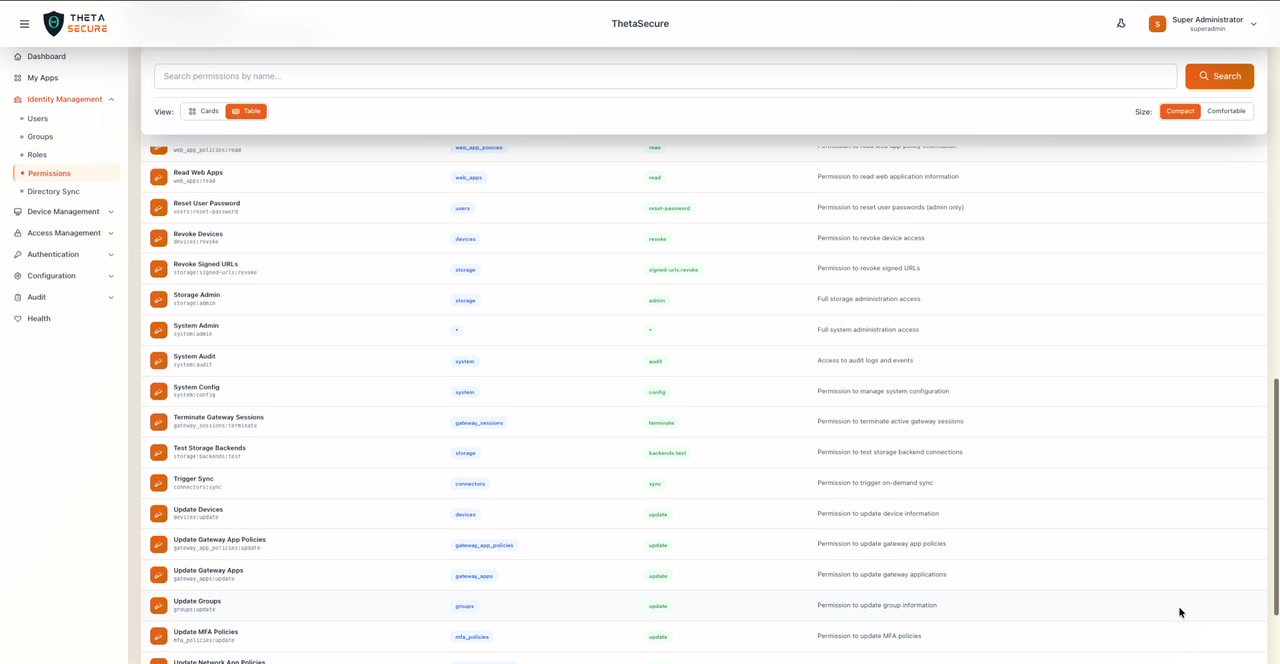
| Storage Admin | storage | Full storage administration access |
| System Admin | system | Full system administration access |
| System Audit | system | Access to audit logs and events |
| System Config | system | Manage system configuration |
| Terminate Gateway Sessions | gateway_sessions | Terminate active gateway sessions |
| Test Storage Backends | storage | Test storage backend connections |
| Trigger Sync | connectors | Trigger on-demand directory sync |
Update
| Permission | Resource | Description |
|---|---|---|
| Update Devices | devices | Update device information |
| Update Gateway App Policies | gateway_app_policies | Update gateway app policies |
| Update Gateway Apps | gateway_apps | Update gateway applications |
| Update Groups | groups | Update group information |
| Update MFA Policies | mfa_policies | Update MFA policies |
| Update Network App Policies | network_app_policies | Update network app policies |
| Update Network Apps | network_apps | Update network applications |
| Update Notification Providers | notifications | Update notification providers |
| Update Notification Templates | notifications | Update notification templates |
| Update OAuth Clients | clients | Update OAuth2 clients |
| Update OAuth Scopes | scopes | Update OAuth2 scopes |
| Update Permissions | permissions | Update permissions |
| Update Policies | policies | Update authentication policies |
| Update RADIUS NAS Clients | radius | Update RADIUS NAS clients |
| Update RADIUS Policies | radius | Update RADIUS policies |
| Update Roles | roles | Update roles |
| Update Signin Profiles | profiles | Update signin profiles |
| Update Storage Backends | storage | Update storage backends |
| Update Sync Profiles | sync-profiles | Update sync profiles |
| Update Users | users | Update user information |
| Update VPN | vpn | Update VPN profiles, servers, allocations |
| Update Web App Policies | web_app_policies | Update web app policies |
| Update Web Apps | web_apps | Update web applications |
View
| Permission | Resource | Description |
|---|---|---|
| View Dashboard | dashboard | View the dashboard |
| View Health Status | health | View system health status |
Zero Trust in Practice
The breadth of this permissions catalog is intentional. In a zero-trust architecture, administrative access is treated with the same rigor as user access. Every administrator should be verified, every action should be authorized, and every session should be scoped to the minimum necessary privilege.
ThetaSecure enables this by ensuring that no two administrators need to share the same role. A SOC analyst monitoring threat activity receives read-only audit permissions. A directory administrator managing sync profiles receives connector and sync permissions only. A VPN operations engineer receives VPN and RADIUS permissions without touching identity or authentication configuration.
This separation ensures that even if an administrative account is compromised, the blast radius is contained to only the permissions assigned to that specific role. Combined with MFA enforcement and comprehensive audit logging, ThetaSecure's permission model provides defense in depth at the administrative layer.
Best Practices
Treat permissions as building blocks. Do not think of permissions in isolation. Think of them as LEGO pieces for constructing purpose-built roles. Start by listing the tasks a person needs to perform, then select only the permissions those tasks require.
Separate read from write access. Give read-level access broadly for visibility, but restrict create, update, and delete permissions to the people who actually perform those operations. This simple rule eliminates most accidental configuration changes.
Use the search bar. With 173 permissions, scrolling through the full list is impractical. When building a role in the Manage Permissions panel, search by keyword like "vpn", "audit", or "radius" to quickly find relevant permissions.
Review the Roles page regularly. Permissions themselves are static. The real risk is in how they are assembled into roles and who receives those roles. Audit your role assignments periodically to ensure they still match your team's actual responsibilities.